Signature Generator for Online Documents: Sign PDF Instantly
Contents
- Why More People Use a Signature Generator for Online Documents
- Common Problems When You Try to Sign Documents Online
- What Is a Signature Generator and How It Works
- How to Sign PDF Online with a Signature Generator (Step-by-Step)
- Why Handwritten Signatures Matter in Digital Documents
- Signature Generator vs Drawing Your Signature by Hand
- Who Needs an Online Digital Signature Generator the Most
- Why Refont Is a Smarter Signature Generator for Documents
- Final Thoughts: Stop Drawing, Start Signing Smarter
Work doesn’t happen in one place anymore. Contracts are sent by email, invoices are approved online, and brand deals are finalized without anyone ever touching a printer. In a world that runs on digital documents, the way we sign those documents has to keep up.
That’s exactly why the signature generator has become an essential tool for freelancers, creators, small businesses, ecommerce sellers, and personal brands. It removes friction from document signing and replaces outdated habits with something faster, cleaner, and far more professional.
If you’ve ever needed to sign a file right now—without printing, scanning, or drawing a wobbly line with your mouse—you already understand the problem. A good signature generator exists to solve that exact moment.
Why More People Use a Signature Generator for Online Documents
The shift to remote work didn’t just change where we work. It changed how we handle everyday tasks, including document signing. Today, people expect to open a file, sign it, and send it back within minutes—not hours.
This is where a signature generator for online documents quietly becomes a productivity hero.
Instead of breaking your workflow to deal with printers or scanners, a signature generator lets you create a reusable, handwritten-style signature that looks intentional and professional. Once it’s created, you can apply it to contracts, PDFs, invoices, and forms whenever you need it.
For independent professionals and small teams, that time saved adds up quickly. More importantly, it removes a constant source of frustration that most people have simply learned to tolerate.
Common Problems When You Try to Sign Documents Online
Printing and Scanning Is Slow and Outdated
Printing a document just to sign it feels like time travel—and not in a good way. You print the file, sign it, scan it back, rename it, and hope the quality still looks acceptable when you send it.
For anyone handling documents regularly, this process is inefficient and unnecessary. Modern workflows are digital by default, and signing should be too. An online digital signature generator eliminates this entire loop and keeps everything exactly where it belongs: on your screen.
Mouse or Trackpad Signatures Look Unprofessional
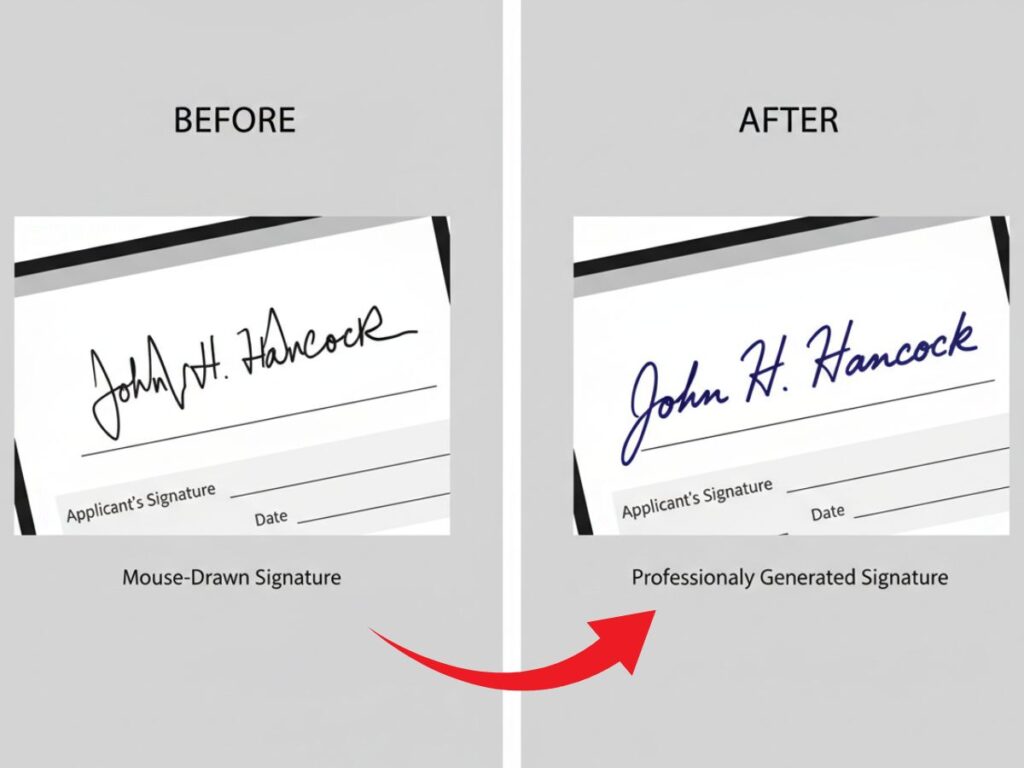
Most online signing tools offer one default option: “draw your signature.” In theory, it sounds fine. In practice, it’s a mess.
Mouse-drawn signatures almost always look shaky, uneven, and rushed. On formal documents, that visual noise sends the wrong signal. It suggests carelessness, even when the content of the document is serious.
Using a signature generator produces a consistent, clean result every time—no retries, no embarrassment, no awkward explanations.
Typed Names Don’t Feel Personal or Trustworthy
Typing your name at the bottom of a document might be fast, but it doesn’t feel like a signature. There’s no personality, no intent, and no sense of confirmation.
A handwritten signature for documents still carries psychological weight. It signals that a real person reviewed the file and agreed to it. That subtle human element matters, especially in contracts, agreements, and official forms.
What Is a Signature Generator and How It Works
At its core, a signature generator is a digital tool that creates a handwritten-style signature based on your name. Unlike basic fonts, modern tools use AI to mimic natural pen movement—variations in pressure, stroke thickness, and flow that make a signature look genuinely human.
A well-built online digital signature generator produces output that’s designed specifically for documents. That means clean edges, proper scaling, and transparent backgrounds that fit seamlessly into PDFs and Word files.
The goal isn’t decoration. It’s usability.
How to Sign PDF Online with a Signature Generator (Step-by-Step)
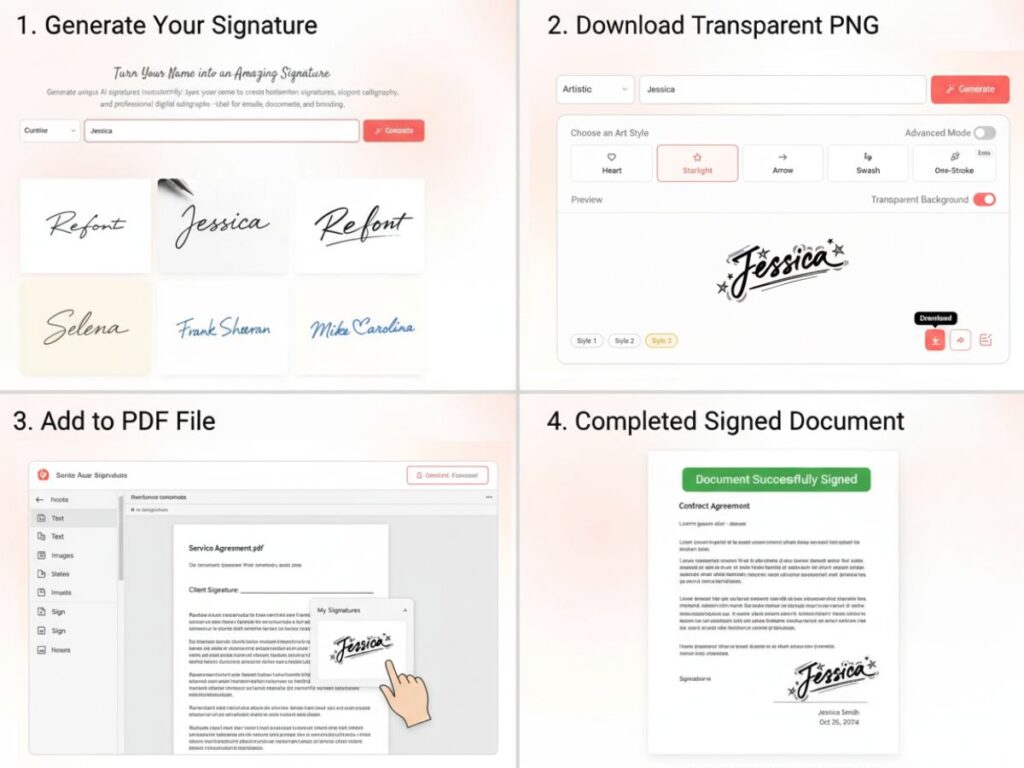
Step 1: Create Your Handwritten Signature for Documents
Start by entering your name into the signature generator. You’ll be presented with several handwritten styles, each with a slightly different personality—from neat and professional to more expressive and creative.
This step matters more than people think. The signature you choose becomes part of how your documents are perceived, especially if you’re building a personal or business brand.
Step 2: Export a Transparent, High-Resolution Signature
Once you’ve selected a style, export your signature as a high-resolution image with a transparent background. This detail is crucial when you want to sign PDF online with a signature generator without the signature looking “pasted on.”
A transparent background ensures your signature blends naturally with any document layout.
Step 3: Sign PDF Online with a Signature Generator in Seconds
Open your PDF or Word file, place the signature where it belongs, resize it if necessary, and save the document. That’s it.
This is the fastest and cleanest way to sign PDF online with a signature generator, whether you’re finalizing a contract, approving an invoice, or submitting official paperwork.
Why Handwritten Signatures Matter in Digital Documents
Even in a digital-first world, handwritten signatures haven’t lost their meaning. In fact, they’ve become more valuable precisely because everything else is automated.
A handwritten signature for documents communicates intention. It shows that someone paused, reviewed the content, and took responsibility for it. That perception matters in legal, financial, and professional contexts.
For creators and small businesses, a handwritten-style signature also reinforces brand identity. It feels personal, not generic—an important distinction when trust is part of the transaction.
Signature Generator vs Drawing Your Signature by Hand
Speed and Convenience
Drawing your signature every time is slow and frustrating. A signature generator creates it once and lets you reuse it whenever needed. Over time, that convenience becomes a serious efficiency upgrade.
Visual Quality and Consistency
Hand-drawn signatures vary wildly from one attempt to the next. AI-generated signatures remain consistent across all documents, which is especially important for businesses and ecommerce operations.
Consistency signals professionalism—even when no one consciously notices it.
Professional Use Cases
From freelance contracts and brand deals to supplier agreements and ecommerce paperwork, professional-looking signatures matter. A reliable signature generator fits seamlessly into these workflows without calling attention to itself.
Who Needs an Online Digital Signature Generator the Most
While almost anyone can benefit from faster signing, certain groups rely on it daily:
- Freelancers and creators handling contracts and invoices
- Small businesses and startups managing operations remotely
- Ecommerce store owners dealing with suppliers and logistics
- Personal brands that value visual consistency and credibility
For these users, an online digital signature generator isn’t a nice-to-have tool. It’s part of doing business efficiently.
Why Refont Is a Smarter Signature Generator for Documents
Refont is designed for people who actually sign documents—not just those who want something that looks interesting. Its signature generator focuses on realistic stroke behavior, clean output, and styles that work across real-world documents.
Instead of forcing users into one generic look, Refont offers flexibility while keeping everything document-ready. The result is a signature that feels natural, professional, and easy to use again and again.
Final Thoughts: Stop Drawing, Start Signing Smarter
If you regularly sign files, struggling with printers or drawing shaky lines with a mouse shouldn’t be part of your workflow anymore. A signature generator is one of those small upgrades that quietly saves time, reduces friction, and improves how your documents are perceived.
Once you experience how easy it is to sign PDF online with a signature generator that actually looks good, it’s hard to go back.